Geometric Border: Crafting Stylish Frames with Double Shapes
When we talk about typography, we often focus on the letters themselves. We debate the merits of a specific serif font for body copy or the readability of a sans serif font for web design. However, the ecosystem of a great design project relies on more than just the alphabet. It requires accents, dividers, and frames to organize information and create visual interest. This is where Geometric Border enters the conversation. It is not your standard text typeface; it is a specialized dingbat font designed to solve a very specific, yet frequent, design challenge: creating clean, modern decorative elements without relying on heavy image files.
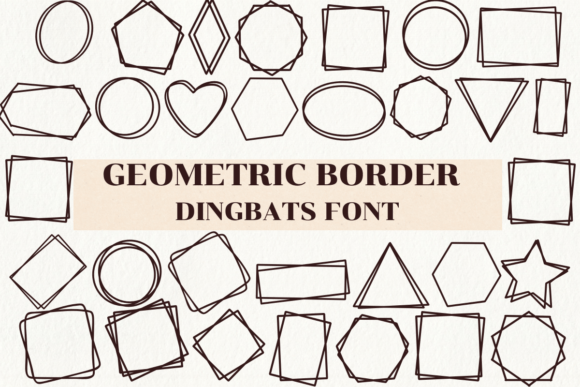
At its core, Geometric Border features a collection of double geometric shapes. Imagine squares within squares, circles inside circles, and triangles paired together to create a cohesive, symmetrical unit. The visual personality of this font is defined by precision and balance. It strips away the ornamental flourishes of vintage design—no scrollwork or floral motifs here—and replaces them with mathematical clarity. The result is a modern typography asset that feels architectural and structured. The "double" nature of the shapes adds weight and depth, allowing the borders to stand out against complex backgrounds or anchor a minimalist layout.
The Visual Power of Double Geometric Shapes
The aesthetic appeal of Geometric Border lies in its ability to be bold without being chaotic. Because the shapes are geometric, they possess an inherent order. When you type out a sequence of characters using this font, you aren't just getting a random collection of icons; you are building a continuous line of repeating patterns. This creates a rhythm that the eye can follow easily. For designers who value grid systems and alignment, this typeface is a natural fit. It reinforces the underlying structure of your editorial design or layout.
Furthermore, the style of Geometric Border bridges the gap between technical precision and artistic flair. It works exceptionally well in projects that require a "tech" or "futuristic" vibe, but it is equally at home in high-fashion contexts where clean lines are prized. The shapes are simple—squares, circles, triangles—but their pairing creates a complexity that elevates the design. It is a premium font solution for anyone looking to add a touch of sophistication to their brand identity without overwhelming the primary message.
Practical Applications Across Industries
Understanding where to deploy a creative font like this is key to getting a return on your design investment. The versatility of Geometric Border makes it a valuable asset across a wide range of industries and project types.
Branding and Corporate Identity
For entrepreneurs and small business owners, consistency is everything. If your brand leans towards innovation, architecture, or modern lifestyle, Geometric Border can become a staple of your visual toolkit. Use it to create distinct frames around your logo on business cards, or as a divider line on letterheads. It helps reinforce a brand identity that is organized and forward-thinking. Unlike a standard script font or handwritten font, which conveys warmth and personality, this geometric set conveys stability and structure.
Digital and Web Design
In web design, borders are often rendered using CSS, which can sometimes look flat or generic. Using a font like Geometric Border allows you to insert vector-based decorative elements that have more character than a standard solid CSS border. You can use these characters to frame "Call to Action" buttons, highlight testimonials, or separate content blocks on a landing page. Because it is a font, it scales perfectly on high-resolution screens without pixelation, ensuring your design assets remain crisp.
Packaging and Product Design
Packaging design often requires intricate details to catch the consumer's eye on a crowded shelf. Geometric Border is perfect for creating labels, especially for products that want to convey a sense of precision or purity—think cosmetics, tech accessories, or artisanal food products with a modern twist. The double-line aesthetic adds a level of perceived quality, suggesting that the product inside is well-crafted and refined.
Social Media and Content Creation
For bloggers, marketers, and content creators, visual hierarchy is crucial for engagement. Social media graphics need to stop the scroll. You can use Geometric Border to create instant frames around quotes, promotional codes, or event dates. It adds a professional polish to Instagram stories or Pinterest pins that standard clipart cannot match. It serves as a display font for graphical elements, ensuring that your key information is visually contained and easy to read.
Strategic Implementation: Readability and Hierarchy
While Geometric Border is visually striking, strategic implementation is necessary to maintain the effectiveness of your design. One of the primary influences of this font is on visual hierarchy. By framing specific text, you naturally draw the viewer's eye to that area first. This is a psychological cue that says, "Look here; this is important."
However, readability must always be considered. Because these are geometric shapes, using them as a background texture behind body text can sometimes create visual noise. The key is contrast. Use Geometric Border to frame white space or solid color blocks, rather than placing them directly behind dense paragraphs. When used as a horizontal rule or a vertical side accent, the shapes guide the eye down the page without interfering with the legibility of your primary text—whether that is a sans serif font for digital use or a traditional serif for print.
Integration and Best Practices
Adopting a new dingbat font requires a bit of testing to ensure it fits your workflow. Here are some practical considerations for designers and creators looking to integrate Geometric Border into their projects.
- Evaluating Font Pairing: This typeface is a specialist. It does not pair with other fonts in the traditional sense of "heading and body." Instead, it pairs with the concept of your layout. It sits beautifully alongside clean sans serifs like Helvetica or Futura, providing a structural counterpoint. It can also add a modern edge to a classic serif like Garamond, preventing the design from looking too dated.
- Reviewing Included Styles: Before starting a project, map out the available shapes. Does the font include corner pieces? Are there variations in weight (thin vs. bold)? Knowing exactly which characters produce which shapes allows you to "draw" with the keyboard, building custom frames that fit your specific content dimensions.
- Licensing and Usage: As a commercial font, it is vital to ensure your license covers your intended usage. If you are creating logo design elements for a client, you typically need a license that permits embedding the font in the final vector file or converting the characters to outlines. Always check the EULA (End User License Agreement) to ensure compliance, especially for packaging design or high-volume print runs.
- Testing for Scalability: Test the borders at various sizes. A thick geometric border might look great as a frame for a poster, but it could become clunky if used as a footnote divider on a business card. Ensure the line weight of the double shapes remains legible at your intended output size.
Conclusion
In the vast world of modern typography, it is easy to overlook the utility of dingbats and decorative fonts. Yet, tools like Geometric Border are often the secret weapon of experienced designers. They provide a quick, consistent, and scalable way to add structure and style to a project. Whether you are a graphic designer building a brand system, a marketer creating engaging social content, or a crafter looking for the perfect frame for a digital print, this font offers a clean, geometric solution. By leveraging its double shapes and symmetrical patterns, you can elevate your work from simple text on a page to a fully realized, professional visual experience.