Corner Borders: The Sketched Dingbats Font for Authentic Designs
There’s a specific kind of charm that comes from something that looks hand-drawn. In a world saturated with perfect vectors and flawless digital lines, a touch of human imperfection can feel like a breath of fresh air. This is the space where Corner Borders, a unique dingbats font, makes its mark. It’s not just a collection of symbols; it’s a toolkit for adding warmth, character, and a sketched, artisanal feel to your work. If you’ve ever felt your designs needed a more personal, handmade touch, this typeface is worth a closer look.
Understanding the Hand-Drawn Aesthetic of Corner Borders
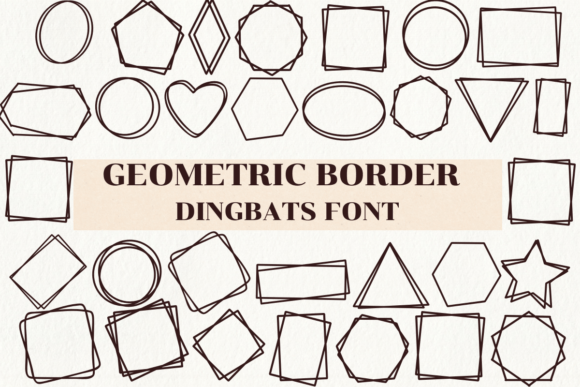
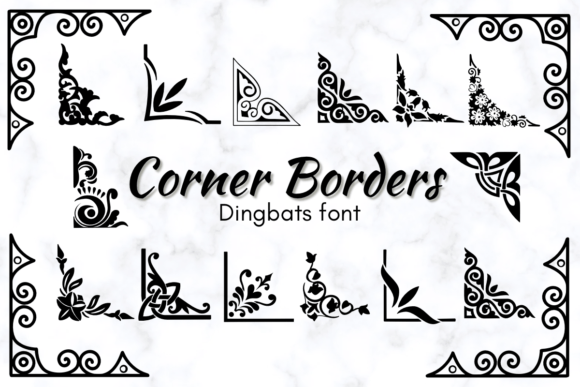
At its core, Corner Borders is a dingbats font. This means each letter on your keyboard doesn’t produce a standard character, but instead a decorative graphic—in this case, corner designs and ornamental frames. The defining characteristic is its sketched theme style. The lines aren't sterile and uniform; they have a slight, organic wobble that mimics the natural pressure of a pen or brush on paper. This gives each piece of clip art a human quality that’s difficult to replicate with standard design software tools.
The personality of Corner Borders is approachable, rustic, and creative. It leans into a handwritten font sensibility without being a script. Think of it as the visual equivalent of a friendly note or a carefully crafted invitation. Its appeal lies in its ability to instantly soften a design, making it feel more intimate and less corporate. For projects where you want to convey authenticity, craftsmanship, or a DIY spirit, this font is an invaluable design asset.
Where This Creative Font Truly Shines: Practical Applications
The versatility of a good dingbats font is often underestimated. Corner Borders is a creative font that can elevate a wide array of projects, both personal and commercial. Its strength is in adding detail and framing without overwhelming the main content.
For Print and Physical Products
This is where the font’s sketched aesthetic feels most at home. Imagine using it to create delicate corner flourishes on wedding invitations, place cards, or menus. It can add a cohesive, handcrafted element to a stationery suite. For crafts and DIY projects, the borders are perfect for framing scrapbook pages, decorating journal entries, or adding flair to handmade greeting cards. In packaging design, a small Corner Border on a label or box can hint at the artisanal quality of the product inside, directly influencing brand perception by suggesting care and attention to detail.
Digital and Branding Projects
Don’t limit this font to physical media. It translates beautifully to digital screens. Use it to create eye-catching frames for quotes or testimonials on social media graphics. It can add personality to a blog’s featured image or a YouTube video thumbnail. For logo design, a small corner element from the font could become a recognizable part of a brand’s mark, especially for businesses in the wedding, craft, bakery, or boutique sectors. When integrated into a brand identity system—on a website header, business card, or email newsletter—Corner Borders helps build consistency and a memorable, friendly brand identity.
Editorial and Layout Design
In editorial design, such as for magazines, lookbooks, or e-books, these dingbats can be used to frame pull quotes, chapter headings, or section dividers. This not only enhances the visual hierarchy by drawing the eye but also improves the overall reading experience by breaking up text in a visually pleasing way. It’s a subtle tool for audience engagement, making pages feel more dynamic and curated.
Making Corner Borders Work: A Designer’s Practical Guide
Choosing any creative font requires more than just liking how it looks. You need to ensure it fits the project’s goals and works well with other design assets. Here’s how to approach using Corner Borders effectively.
Evaluating Fit and Readability
First, consider your project’s tone. Corner Borders excels in contexts that value warmth and personality. It might be less suitable for a formal financial report, but perfect for a local cafe’s menu or a wedding planner’s portfolio. Because it’s a display font (dingbats are a type of display), its primary job is visual appeal, not body text readability. Use it for accents, not for paragraphs of writing. Always test the symbols at the size you intend to use them to ensure the sketched details remain clear and don’t become a muddy blob, especially in small print or low-resolution screens.
Mastering Font Pairing and Hierarchy
The real magic happens when you pair Corner Borders with other typefaces. Its sketched, informal style creates a beautiful contrast with cleaner fonts. For a balanced font pairing, try it with a sturdy sans serif font for body text or a classic serif font for headings. This contrast allows the decorative elements to stand out without competing. You could also pair it with a complementary script font for a cohesive, handmade look, but be careful to maintain enough contrast so the design doesn’t become chaotic. Using the borders to frame a headline set in a bold modern typography style can create a striking and sophisticated effect.
Checking Licensing and Technical Details
Before you download, understand what you’re getting. Is it a premium font or a free one? If you plan to use it for client work, merchandise, or any commercial project, you must verify the commercial font licensing. Check the license file that comes with the download. Does it cover logo creation? Can you use it on products for sale? Also, review the included styles. Some dingbats fonts come with multiple weights or variations, giving you more design options. Ensure the file format (OTF, TTF) is compatible with your software, whether it’s for web design or desktop applications.
Ultimately, Corner Borders is more than just a set of pretty corners. It’s a versatile tool for adding a human touch. By understanding its sketched personality, exploring its applications across different media, and applying it thoughtfully within your designs, you can leverage this font to create work that feels more authentic, engaging, and professionally polished. It’s a small detail that can make a significant difference in how your audience connects with your visual message.